Parking Mission Control
Control centre overview by day and area: Mary Brown Convention Centre / MBC, D1, and D2 / St. John's Convention Centre (SJCC). Shows shift captains, assigned positions, times, and check-in status.
Daily Area Coverage
Bus Captain Overview
Drop-off / Pick-up Flow
Traffic attendants
- Direct cars only until they are safely stopped.
- Once safe, signal attendants to approach the vehicle.
- Keep cars moving as directed; do not step into unsafe traffic flow.
- If a traffic control company is present, follow their direction.
Passenger attendants
- Approach vehicles only after traffic attendants signal it is safe.
- Assist passengers promptly and kindly.
- Keep loading/unloading short so traffic does not back up.
- Use hi-viz vests while working around vehicles.
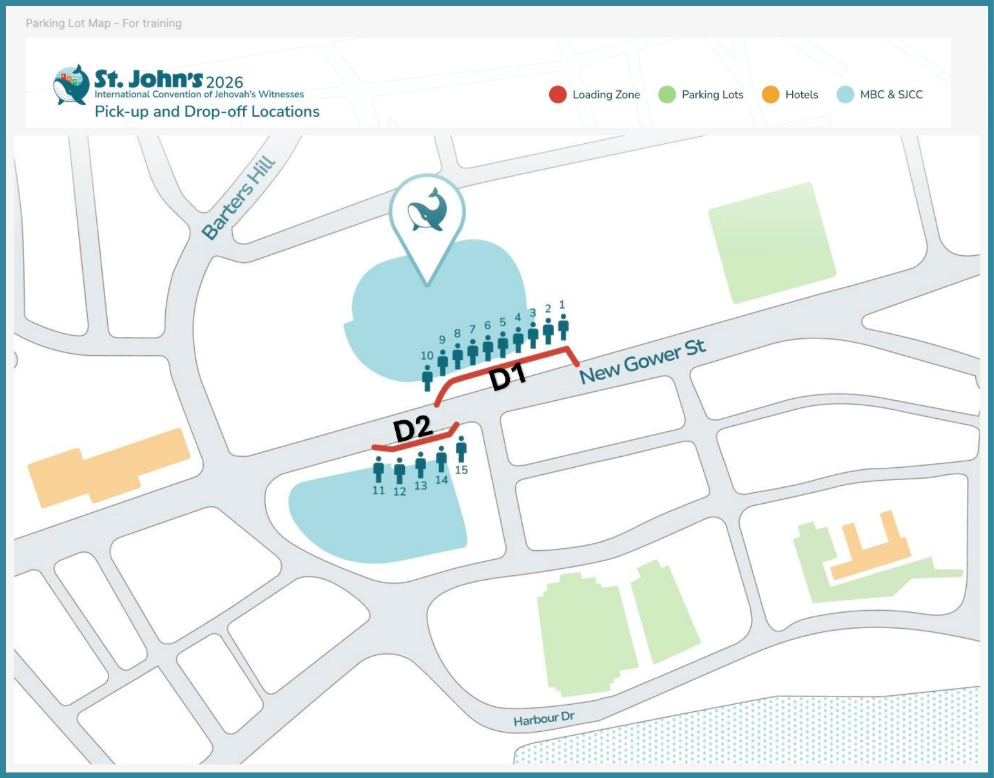
Position Map
Map from the drop-off positions document. D1 shows positions 1–10 along New Gower St. The document image also shows D2 positions 11–15, but the current schedule lists D1 positions 1–10 plus D2 / St. John's Convention Centre (SJCC) and MBC support.
Position Assignments
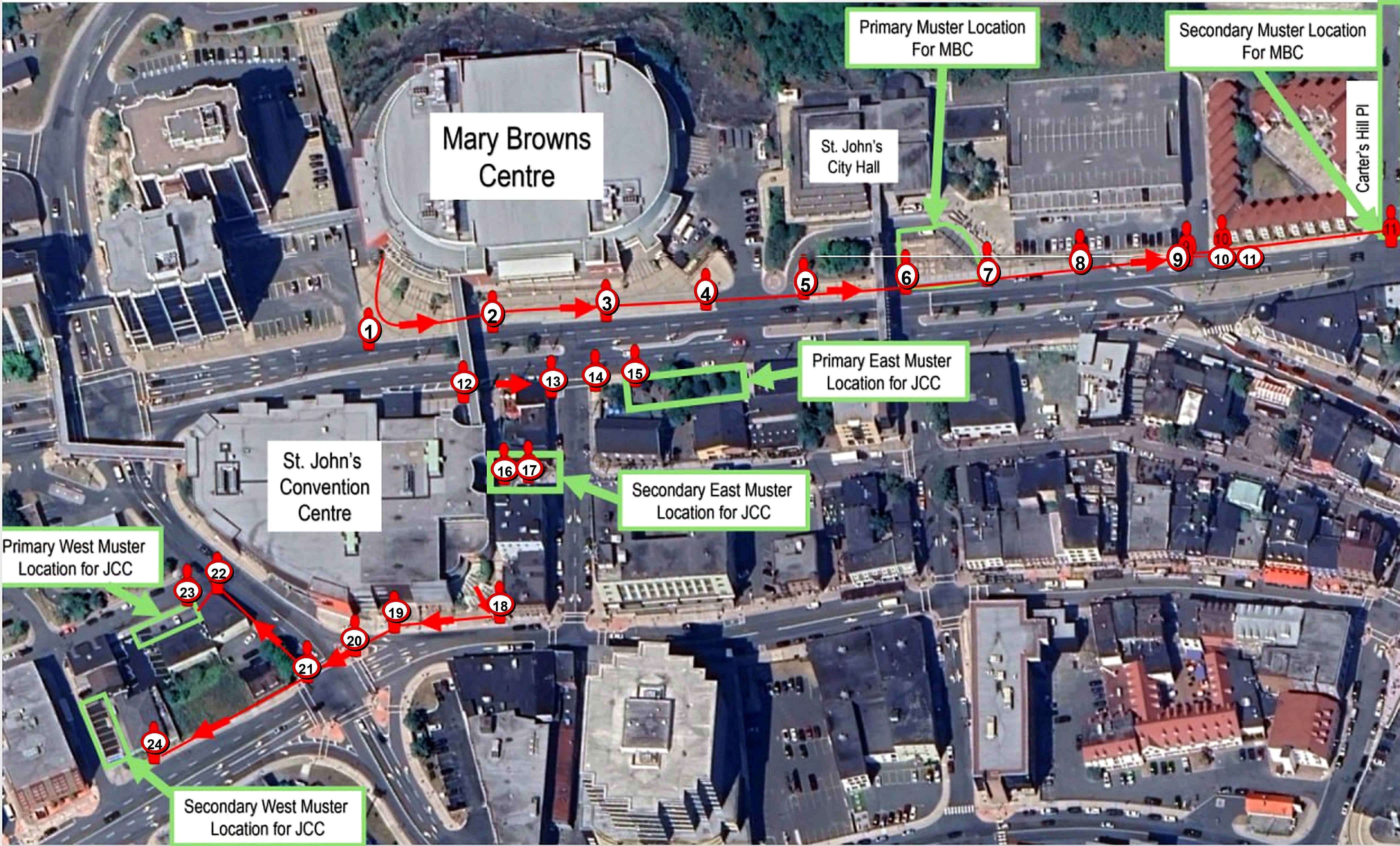
Evacuation Positions
Emergency evacuation / muster-location reference for Mary Browns Centre and St. John’s Convention Centre.
Tap the picture to enlarge
Find My Shift
Search by name, position, day, or role. Contact details from the source PDF are intentionally not shown on this draft page.
Shift Captain Quick Reference
Start of shift
- Arrive early and welcome/orient volunteers.
- Set up necessary WhatsApp communication with the day's hotel overseer and related shift captains.
- Keep chats brief, factual, and necessary. Do not use delegate names outside approved systems.
- Document important issues for shift change.
Escalation levels
- Level 1: minor volunteer, timing, flow, and hand-off issues you can resolve calmly.
- Level 2: repeated issues, hotel staff conflicts, transportation disruptions, or anything affecting multiple people — bring to hotel overseer/key man.
- Level 3: medical emergency, safety concern, delegate in distress, urgent/unclear matters — escalate immediately.
Bus Tracker
Use this for live opt-in bus captain location. The captain enters their name and phone number, allows location access when prompted, and their colour pin appears on the map below.
Bus Captain 1
Waiting for this captain to share location.Bus Captain 2
Waiting for this captain to share location.Bus Captain 3
Waiting for this captain to share location.Bus Captain 4
Waiting for this captain to share location.Bus Captain 5
Waiting for this captain to share location.Bus Captain 6
Waiting for this captain to share location.Key FAQ Notes
- Medication: Do not share medication. Direct to pharmacy, hotel help desk, medical team, or qualified help as appropriate.
- Language barriers: Download Google Translate or Apple Translate and needed languages in advance.
- Lost items: Take items to the hotel information desk at the end of shift; report who/what/activity if known.
- Media: Do not give official statements. Collect contact info/deadline and forward to the shift captain/key man/PID.
- Non-delegate ride requests: Kindly explain the shuttle is prearranged for scheduled international delegate transportation only.
- Children/extra people: Curb/dispatch assignments are high-risk moving-vehicle areas; only assigned/trained volunteers should be present.